
Free SEO Chrome Extension
Find what’s wrong on any page, instantly.
Siteline is a Chrome extension that opens in the side panel and reads the page you’re on: whether it can be indexed, the title as Google cuts it, headings, schema, images, and the status of every link. Drag across Google results, or any links, to open them all at once.
Free. No account needed.
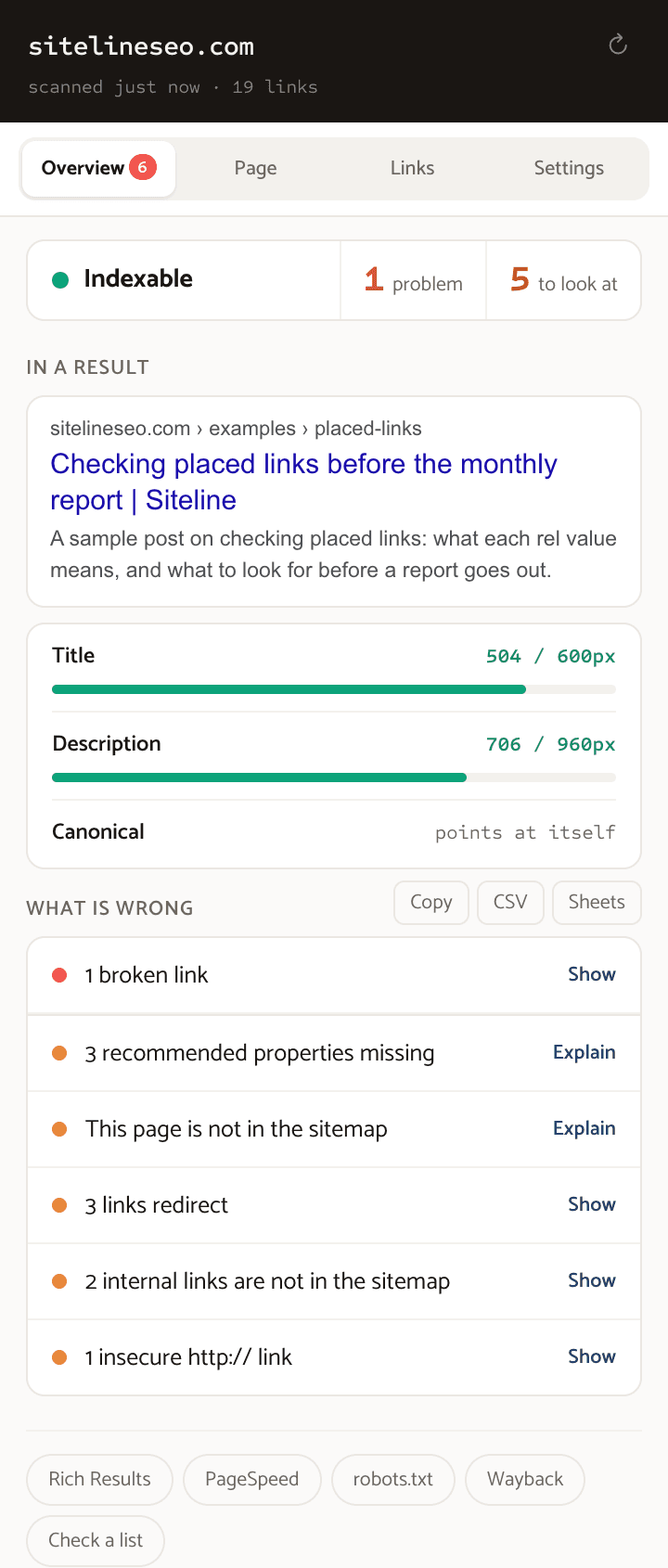
Spot nofollow links without opening DevTools.
Turn on Mark page and every nofollow, sponsored and ugc link gets a colored outline and a badge, right in the page. Try it here: the links in the example are real.
Live example
What the rel values tell you
A guest post carries a nofollow link, a review marks its link sponsored, and a forum reply arrives as ugc. Now and then a publisher marks one link with all three. A link with no rel, like this one to Google’s guide on outbound links, is followed, and so is this one to this site’s privacy policy.
Open a page of Google results in one drag.
Hold Shift and drag a box across the results, or across links on any page. Let go and every link you caught opens in a new tab. Hold Alt (Option on a Mac) instead and the URLs are copied, one per line.
A counter beside the pointer shows how many links are in the box. Links with no text and repeats of a URL you already caught are skipped. Turn drag-select on in Settings, and change the keys there if you like.
Hold Shift and drag across the results. Hold Alt (Option) to copy them instead.
On a touch screen, turn on drag first:
Live exampleResults for “nofollow links”
- developers.google.com › search › docsQualify your outbound links to GoogleGoogle’s guidance on rel="sponsored", rel="ugc" and rel="nofollow", and when to use each.
- en.wikipedia.org › wiki › NofollowNofollowWhere the nofollow value came from, and how search engines have treated it since 2005.
- developers.google.com › search › blogEvolving “nofollow”: new ways to identify the nature of linksThe 2019 announcement that added sponsored and ugc, and made nofollow a hint.
- developer.mozilla.org › docs › Web › HTMLThe rel attributeEvery link type the rel attribute accepts, from nofollow to noopener.
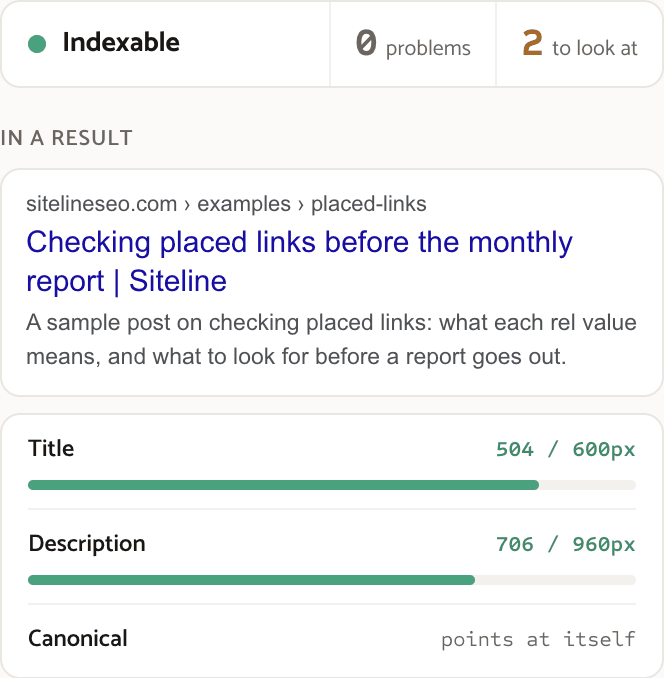
Know if Google can index the page.
The moment the panel opens, Siteline reads meta robots, the X-Robots-Tag header, robots.txt and the canonical, and gives the verdict at the top: indexable, or the reason it isn’t.
Below it, the title and description are measured in pixels, the unit Google truncates by.
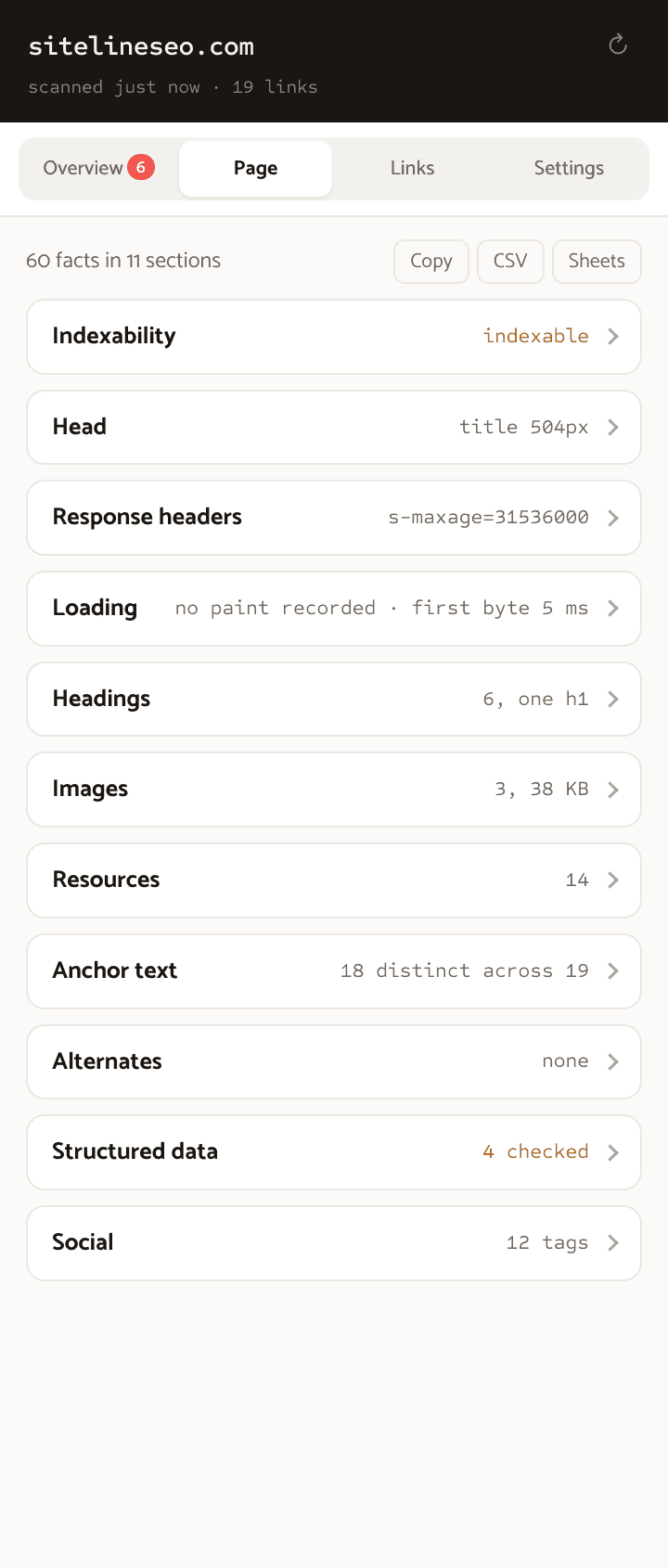
Read the page without opening view-source.
Head tags, response headers, load timings, headings, images, anchor text, hreflang, structured data and the share card each get a section. A closed section still shows its summary, so a 612px title is visible before you open anything.
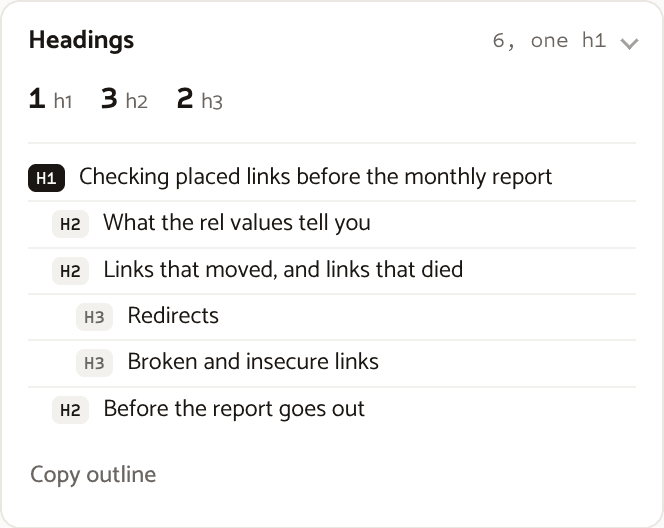
Skipped levels, marked.
The h1 to h6 outline, indented, with empty headings and skipped levels flagged on the line where they happen. Copy it in one click.
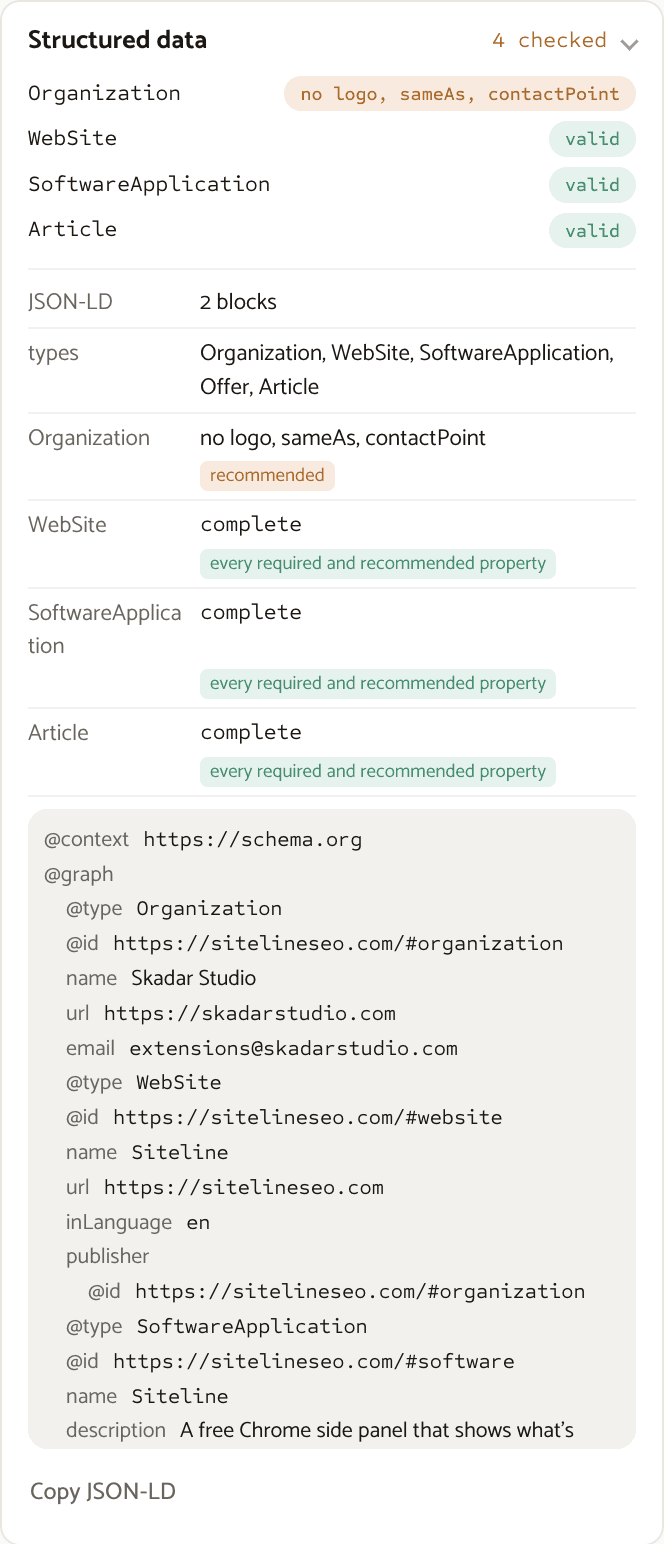
Schema, checked against Google’s rules.
JSON-LD, microdata and RDFa, validated against the rich result requirements for 20 types. A type it has no rules for says “not checked”, instead of a pass it didn’t earn.
Find the dead link before your client does.
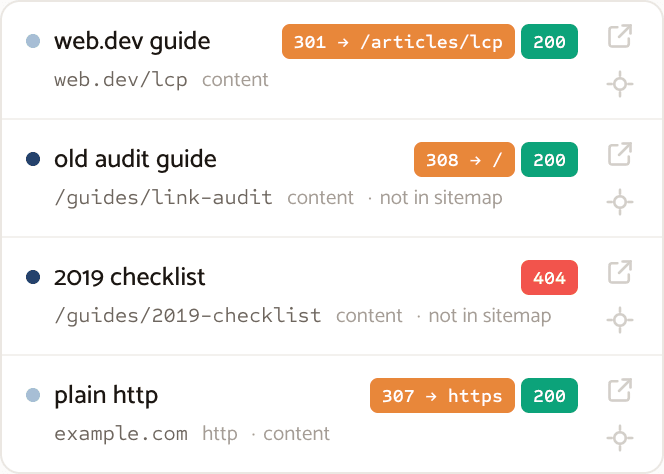
Run checks requests every link on the page. A redirect shows the code the link answered with and where it went, then what answered there: 301 to /articles/lcp, then 200. A checker that follows redirects quietly would have printed 200.
The same run reads the sitemap and follows the canonical.
Every Google result, numbered and checked.
Siteline never runs a search of its own. On a Google results page you opened, each organic result gets a bar with its position, the status code it answered and where it redirects. The bar also flags AI Overview citations, titles Google cut short, noindex and plain http, and marks your own domains Yours.
ExampleResults for “rel nofollow”
- developers.google.com › search › docsQualify your outbound links to GoogleGoogle’s guidance on rel="sponsored", rel="ugc" and rel="nofollow".
- ahrefs.com › blog › nofollow-linksWhat Is a Nofollow Link? Everything You Need to Know (No ...What a nofollow link is, and when a link should carry one.
- support.google.com › webmasters › answerUse rel="nofollow" for specific linksGoogle’s first help page on nofollow, from before sponsored and ugc existed.
- sitelineseo.com › examples › placed-linksChecking placed links before the monthly reportWhat each rel value means, and what to look for before a report goes out.
Siteline
4 organic results · 1 yours
- in the AI Overview2
- checked, ok3
- redirected1
Right-click a result to audit it in the panel.
Check a column of URLs in one paste.
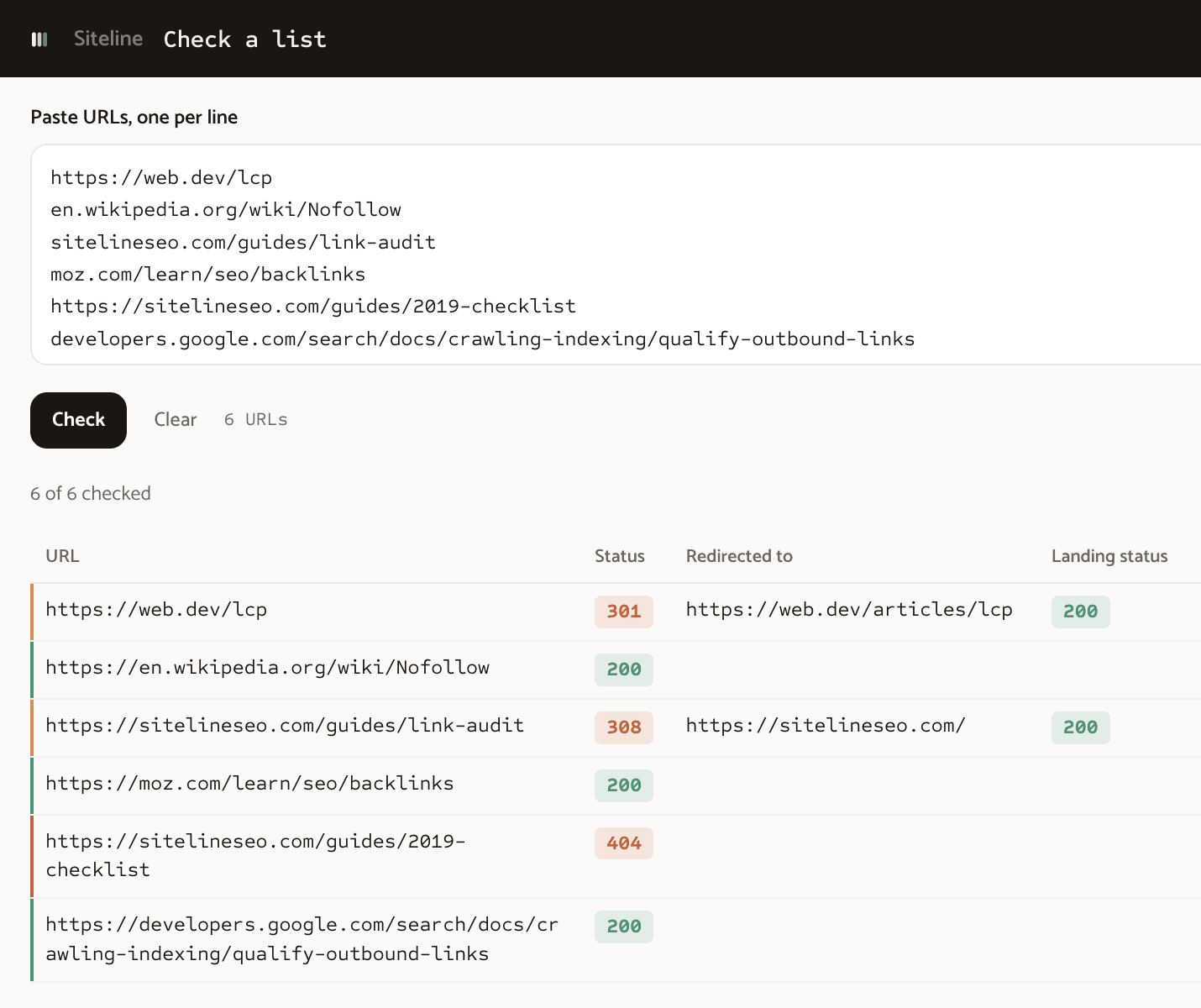
Check a list opens in a tab of its own. Paste up to 1,000 URLs from a spreadsheet, a sitemap or a client’s email, with or without https://, and every one gets its status, where it redirects, what answered there and how long it took. Copy the table or save it as CSV.
Lines that aren’t URLs are named under the box, so 38 checked out of 40 pasted never passes for all 40. Open it from the Overview tab, the right-click menu, or Open as a list on a page of Google results.
Also in the extension
- Exports
- Copy, CSV or a Google Sheet from every tab, with the columns you pick.
- Sitemap
- Whether this page is listed, missing, or listed under a different spelling.
- Canonical, followed
- Catches a canonical that points at a 404, a redirect or a noindex page.
- hreflang
- Every alternate, and whether each one links back.
- Share card
- Open Graph and Twitter tags drawn as the card people will see.
- Images
- Missing alt text, broken files and anything over 1 MB. Download one or all.
- Anchor text
- Repeated anchors, and the same words pointing at different pages.
- JavaScript-only links
- Links that appear only after scripts run, counted against the HTML the server sent.
- Mixed content
- Scripts, styles and images loaded over http on an https page.
- Right-click tools
- Open a page or link in the Wayback Machine, Ahrefs, Semrush, Moz, Majestic or SimilarWeb.
- Load timings
- LCP, CLS and INP as your browser recorded them, plus the response headers.
Questions
Is Siteline free?
Yes. There’s no paid version, and you don’t need an account.
Does it send anything about the pages I inspect?
No. Siteline has no server. Your settings stay in Chrome’s local storage, and scan results are dropped when you close the panel. When you run checks, the requests go straight to the sites being checked, without your cookies. Two small requests happen on every scan: the page itself, to read its X-Robots-Tag header, and that site’s robots.txt.
Why does it ask to read and change data on all websites?
That permission is what lets it read whichever page you have open and check the links on it, and it cannot know in advance which sites you will inspect. It changes a page only when you ask it to mark links, using a stylesheet that is gone when you reload.
Will marking links break a page’s layout?
No. Marks are drawn with outlines and backgrounds that take up no space, and the badges float over the link instead of pushing text aside.
Which pages won’t it work on?
Chrome does not let any extension run on chrome:// pages, the Chrome Web Store or other extensions’ pages, and Siteline says so when you open it there. It also leaves Google results pages unmarked, since those get their own overlay.
Why can’t it check search results in an incognito window?
In incognito, Google links each result through its own redirect with the destination encrypted, so the results page never says where a result goes. Siteline still numbers the results, and still spots yours from the web address Google prints above each title, but it can’t check their status codes or copy their URLs. Following every redirect to find out would look to Google like a click on each result, and after a few of those Google starts asking whether you’re a robot, on your own searches too. Run the same search in a normal window to get the full overlay.
Does it check links on pages behind a login?
The panel reads the page as it appears in your tab, logged in or not. Link checks are sent without your cookies, so each link is checked the way an anonymous visitor would see it.
Siteline collects nothing.
Read the privacy policy- Runs in your browser
- Siteline has no server. Pages are read in your own tab, and nothing is sent to us.
- Settings stay in Chrome
- They’re saved in Chrome’s local storage. Scan results are dropped when you close the panel.
- Checks without your cookies
- Link checks go straight to each site, the way an anonymous visitor would arrive.
- Nothing to sign up for
- Install it and open the panel. There’s no account to make.
Open it on your worst page.
Free, for Chrome 116 or later.